

Top Environmental Risks in Data Centres and How to Mitigate Them
Identifying Hidden Environmental Risks That Lead to Downtime and Hardware Failure
Even with advanced hardware backups like N+1 or 2N redundancy, data centres are only safe from equipment breakdowns. Such systems do not inherently protect against environmental risks. Unstable conditions are a cunning threat; they slowly degrade components, often unnoticed, until a sudden, major failure occurs. Therefore, to truly minimise the risk of downtime, you must proactively tackle the key data centre environmental risks that threaten smooth operations:
The article will cover the primary risks to data centres, including:
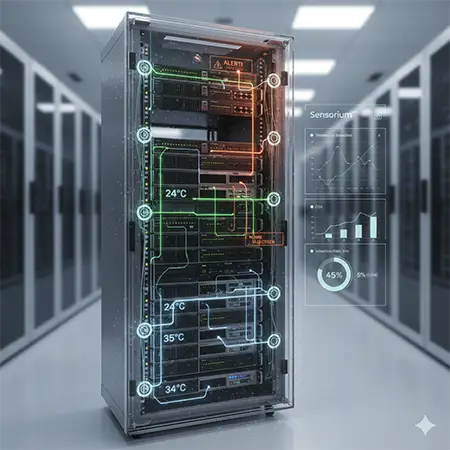
Temperature Extremes and Thermal Hotspots
In a data centre, “average room temperature” hides a critical truth: heat is rarely uniform. This misleading metric can mask dangerous hot spots where a single server overheats and fails, even as the rest of the room stays perfectly cool. To truly understand and prevent such failures, we must examine how these thermal imbalances occur and the significant long-term costs of neglecting them.
1. The Anatomy of a Thermal Hot Spot
A hot spot describes a localised area where heat builds up faster than cooling systems can remove it. Common causes include:
- Airflow Blockages: These go beyond stray cables. Internal server congestion from dust buildup or poor cabling inside a rack creates “air dams.” These dams force hot exhaust air to recirculate back into server intakes, reheating components.
- Overloaded Racks: High-density equipment, such as AI/GPU clusters, generates immense heat, creating a “thermal shadow.” Placing these powerful racks in rows designed for less intensive servers overwhelms local cooling, even if the main CRAC units seem to have capacity.
- Poor Air Distribution: Cooling air often escapes before it reaches the equipment. Missing or poorly placed floor tiles allow pressurised cold air to leak into the room instead of flowing directly through server chassis.
2. The Cost of "Throttling"
Modern CPUs protect themselves from overheating. When a hot spot develops, a server rarely crashes outright. Instead, it begins “thermal throttling.”
- Performance Tax: To cool down, the CPU actively reduces its clock speed. Your high-performance hardware starts operating at a fraction of its potential, leading to frustrating latency spikes and application lag. IT teams find this problem incredibly difficult to diagnose without proper environmental monitoring, from systems such as the iSensor Controller.
- Component Aging: Even without a shutdown, operating near the thermal limit actively causes “Electromigration.” This process gradually displaces atoms in the processor’s conductive traces, permanently degrading the silicon. Consequently, this shortens a hardware’s typical 5-year lifecycle to 3 years or even less.
3. Advanced Mitigation Strategies
Effective strategies go beyond simply “turning up the AC.” Instead, consider these advanced mitigation techniques:
- Computational Fluid Dynamics (CFD): Use monitoring data to build a “digital twin” of your airflow. This visual model clearly shows where cold air is wasted and where hot air “pools.”
- Rack-Level Sensor Placement: Install sensors at the top, middle, and bottom of each rack, covering both intake and exhaust. Remember, heat rises. A floor-level sensor might report a perfect 20°C, while the top server in the same rack struggles at 35°C.
- Blanking Panels: This simple but critical fix uses blanking panels in empty “U” spaces. They stop hot exhaust air from leaking back to the front of the rack, ensuring a direct, one-way path for cooling airflow.
Humidity Imbalances
Achieving the “Goldilocks zone” for humidity is one of the toughest tasks in data centre management. Because moisture levels are highly sensitive to external weather, cooling cycles, and air pressure, they are hard to stabilise. Unfortunately, humidity damage usually builds up slowly and remains invisible until the hardware fails completely.
1. High Humidity: The Microscopic Threat
When relative humidity (RH) exceeds 60%, the risk to the data centre environment becomes hazardous to electronics.
- The Dew Point Risk: When warm air hits a cold cooling coil or server intake, the moisture turns into liquid water. This condensation can cause electrical shorts.
- Acid and Metal Whiskers: Moisture allows air pollutants, like sulphur, to turn into corrosive acids. This process triggers “Electrochemical Migration,” where tiny metal whiskers grow across circuit boards and cause permanent damage.
- Conductive Dust: Dust particles act like tiny sponges. High humidity turns dry dust into a conductive sludge that traps heat and leaks electricity between sensitive components.
2. Low Humidity: The Invisible Spark
In contrast, when RH drops below 40%, the air loses its ability to bleed off static, allowing electricity to build up on every surface.
- Electrostatic Discharge (ESD): In dry air, simple actions like a technician walking or sliding a server into a rack can create a massive static spark of several thousand volts.
- Hidden Failures: An ESD event often causes a “latent defect” rather than an instant break. It weakens the silicon, leading to erratic behaviour or a crash months later, which makes troubleshooting nearly impossible.
- Signal Interference: Extreme static buildup can scramble high-speed data signals or even corrupt magnetic storage drives.
3. Smart Monitoring and the "Envelope" Strategy
To manage these environmental risks, modern data centre facilities follow ASHRAE guidelines to keep moisture within a safe “envelope.”
- Tracking the Dew Point: Smart systems track the Dew Point rather than just Relative Humidity. Since RH changes whenever the temperature shifts, the dew point provides a much more stable and accurate measurement of condensation risk.
- Vertical Monitoring: Because cold air is heavy and holds less moisture, the floor level is often much damper than the ceiling. Therefore, managers must place sensors at multiple heights to get a full picture of the room.
- Steady Adjustments: Automated systems should add or remove moisture in tiny increments. This prevents “hunting,” a common problem where the cooling system over-corrects and swings wildly between being too wet and too dry.
Airflow Disruption and Pressure Imbalance
In a data centre, airflow carries heat away from critical equipment. Even the most powerful cooling systems will fail if air does not move properly—either in the wrong direction or at the wrong pressure. To optimise cooling, we need to understand how static pressure and airflow dynamics impact efficiency.
1. Pressure Imbalance: Why Air Takes the Easy Way Out
Air always follows the path of least resistance. In raised-floor designs, the under-floor plenum must maintain positive pressure to push cold air up through perforated tiles. However, problems arise when airflow is disrupted:
- Obstructions Under the Floor: Poorly organised cables act like dams, creating pressure drops. Some racks get excessive airflow, while others—especially at the row’s end—receive almost none.
- Bypass Air Leaks: Gaps around cable openings let cold air escape before reaching servers. This wasted airflow returns to cooling units unused, reducing system efficiency and starving other racks.
2. Airflow Disruption: Turbulence and Recirculation
When airflow is disrupted, the separation between hot and cold zones breaks down, leading to dangerous cooling failures:
- Hot Air Recirculation: Missing blanking panels allow hot exhaust air to circle back into server intakes. The servers then “breathe” their own hot exhaust air, causing temperatures to spike—even in a seemingly cold room.
- Turbulence: Fast-moving air hitting obstacles (like misaligned tiles or poorly placed rack doors) creates chaotic eddies. This forces server fans to work harder, increasing energy use and failure risks.
3. Proactive Monitoring for Smarter Cooling
Instead of waiting for overheating alarms, track airflow metrics to prevent data centre risks before they escalate:
- Pressure Sensors: By placing sensors in the under-floor plenum and in the “white space” above, you can calculate the differential pressure. A drop in this delta is an early warning that a floor tile has been left open or a cooling fan is failing—long before the servers begin to overheat.
- VFD Optimisation: Modern monitoring systems use airflow data to control Variable Frequency Drives (VFDs) on cooling units. Instead of running fans at 100% all the time, the system adjusts fan speeds based on the actual pressure demand of the racks, significantly lowering PUE (Power Usage Effectiveness).
By mastering airflow dynamics, data centres can boost cooling efficiency, cut costs, and prevent downtime.
Dust and Airborne Particle Contamination
Dust acts as a hidden enemy for data centres. These tiny particles settle inside servers, choking the airflow and trapping heat around critical parts. Because of this, dust causes physical damage that you cannot fix by simply lowering the room temperature. While heat is the visible symptom, dust is the actual disease that leaves hardware vulnerable to almost every environmental risk.
1. The "Insulation Effect" and Thermal Stress
Dust works like a thick, unwanted blanket. When a layer of grime covers internal components, it creates a barrier between the hot silicon chips and the cooling air.
- Choking Critical Parts: Dust blocks the tiny gaps in heat sinks, which reduces their ability to shed heat. Even if the room feels cool, the inside of a dusty server can run 10ºC to 15ºC hotter than a clean one.
- Mechanical Strain: To fight this trapped heat, internal fans must spin at their maximum speed. Consequently, this leads to more vibration, higher energy bills, and helps the fans wear out much faster.
2. The Chemistry of Contamination: "Silver Whiskers"
In modern facilities, dust is more than just “dirt.” It often contains a toxic mix of sulphur, salt, and metal fibres.
- The Moisture Trap: Many dust particles are “hygroscopic,” meaning they soak up water from the air. When humidity levels rise, this dust transforms into a conductive sludge.
- Chemical Growth: This sludge triggers “Silver Whiskers” or copper corrosion on the motherboard. These tiny metal threads grow between electrical paths, causing random data errors and, eventually, permanent short circuits.
3. Advanced Defence: Beyond the Vacuum
Stopping dust requires a multi-layered shield that protects the building from the outside in.
- Better Filtration: Data centres should use filters with MERV 11 to MERV 13 ratings to catch the smallest particles. However, teams must monitor these closely; if a high-efficiency filter clogs, it can collapse and send a sudden cloud of dust into the server room.
- Using Air Pressure: Operators should keep the air pressure inside the data centre higher than in the surrounding hallways. This ensures that when someone opens a door, clean air pushes out, which stops dirty air from being sucked in.
- Real-Time Particle Monitoring: Modern air particle sensors now track both fine (PM2.5) and coarse (PM10) particles. A sudden jump in large particles usually points to human activity, like unboxing new equipment. Conversely, a rise in fine particles often signals that the building’s main filters have failed.
Elevated Carbon Dioxide (CO2) Levels
Carbon dioxide (CO2) poses no direct threat to server hardware itself. However, it serves as a remarkably insightful indicator of your data centre’s air exchange and ventilation system efficiency. Crucially, CO2 monitoring bridges the gap between guaranteeing human safety and optimising mechanical performance.
1. The "Proxy" for Air Stagnation
In a well-sealed data centre environment, CO2 levels should remain steady. When they climb, it’s the first clear signal that your “makeup air” (fresh air) system is not working as it should.
- HVAC Inefficiency: Rising CO2 levels clearly show that Air Handling Units (AHUs) are merely recirculating stale, already-used air rather than actively bringing in fresh, clean air.
- Heat Warning: When air is stagnant enough for CO2 to accumulate, it simultaneously traps heat and moisture within localised pockets. High CO2 levels often reliably precede a thermal spike, effectively providing an early alert before temperature sensors even register an issue.
2. High-Density Environments and "Air Age"
In high-density server clusters—common for intense applications like AI or high-performance computing—air moves in massive volumes.
- Old Air’s Toll: Elevated CO2 in these intensive zones signals a high “Age of Air”—meaning the air lingers too long within the space. This “old air” significantly loses its capacity to effectively carry heat away from high-power components because it has become saturated with thermal energy, reducing cooling efficiency.
- Better Airflow: By tracking CO2 along with temperature, operators can precisely adjust Variable Frequency Drive (VFD) fan speeds. This ensures air is not just moving but is thoroughly and actively exchanging.
3. Human Safety and Technical Error
Even as data centres become more automated, people still perform crucial maintenance and operational tasks.
- Cognitive Impact: CO2 levels consistently above 1,000 ppm measurably reduce cognitive function and significantly increase the likelihood of human error. In a high-stakes environment where a single “fat-finger” mistake during a rack install could trigger an outage, maintaining consistently low CO2 is not just a safety measure, but a critical reliability requirement.
- Automation Integration: Modern systems utilise Demand-Controlled Ventilation (DCV). When carbon dioxide sensors spot rising CO2 (indicating personnel are present), the system automatically boosts fresh air intake. This keeps staff safe while intelligently maximising energy efficiency when the room is empty.
Water Leaks and Moisture Intrusion
Whilst Fire and heat grab the headlines, water leaks pose a more sudden and devastating threat to data centres. Since water conducts electricity so well, a small leak does more than just soak a component; it triggers violent short circuits that can instantly shut down Power Distribution Units (PDUs) and the entire server racks they feed.
1. Internal vs. External Leak Sources
Most water risks come from the building’s own cooling and utility systems.
- HVAC & CRAC Failure: Cooling units rely on chilled water and create heavy condensation. If a drain line clogs or a heat exchanger cracks, gallons of water can pour directly onto the raised floor.
- Nearby Infrastructure: Data centres often share buildings with “wet” utilities like bathrooms, fire sprinklers, or kitchens. These pipes often run right above or next to the server room.
- The “Slow Drip”: The biggest danger is not a flood, but a tiny, hidden drip under a raised floor. These often go unnoticed until they reach a high-voltage cable and cause a failure.
2. The Geometry of a Disaster
Furthermore, the design of a raised floor makes gravity your enemy during a leak.
- The Low Point: Water naturally pools at the lowest spot of the floor. Unfortunately, this is usually exactly where the heavy power cables and network fibres lie.
- Capillary Action: Moisture can travel upward into server racks by following cable bundles. This can lead to hidden corrosion on the tiny pins of expensive switches and motherboards.
- Humidity Spikes: Standing water quickly raises local humidity. This creates a high risk of condensation and encourages “silver whiskers” to grow on metal circuits, which causes even more shorts.
3. Precision Detection Technologies
To prevent these disasters, you must place sensors in high-risk zones to create a digital “fence” around your hardware.
- Liquid Leak Sensor Rope: Technicians wrap these specialised cables around cooling units or lay them alongside under-floor pipes. They sense a single drop of water and can tell you exactly how many meters away the leak is located. These ropes often connect to Volt Free Contact (VFC) Sensors.
- Spot Detectors: These sit in “sumps” or low points where water is likely to gather. They are the best tool for monitoring the space directly under a specific server rack.
- Ultrasonic Flow Meters: These sensors watch the pipes themselves. By comparing the water going out to the water coming back, the system identifies a “micro-leak” inside the cooling loop before water ever touches the floor.
Conclusion
In conclusion, data centres no longer face unforeseen environmental risks; instead, these are predictable metrics operators can manage precisely. By moving from reactive responses to integrated, real-time environmental monitoring, operators prevent threats like thermal hotspots, humidity shifts, and air contamination from escalating into costly outages. This proactive approach goes beyond protecting hardware. It optimises energy efficiency, extends equipment lifecycles, and provides verifiable data for modern compliance. Thus, stable environmental conditions become a cornerstone of strong operational resilience.
For a broader overview on environmental monitoring in data centres and reducing risks, read our Essential Guide to Environmental Monitoring in Data Centres.